

More and more PC gamers have been snapping up high refresh rate displays, some of which have HDR capabilities. If you’re one of those lucky folks, good news! Your PC gaming experience will soon get even better on Windows 11.
Specifically, Microsoft plans to ship a Windows HDR calibration app for PCs soon, allowing Windows 11 to “know” the capabilities of your display, and to allow it to be configured for better color accuracy, AutoHDR, and related features. The other two features are (for now) restricted to the Windows Insider preview program: Windows 11 Insider Build 22557 for the Dev Channel adds optimizations for windowed games, and expands “Dynamic Refresh Rate” 120Hz support for certain Windows laptops (like the Surface Pro 8) beyond just inking.
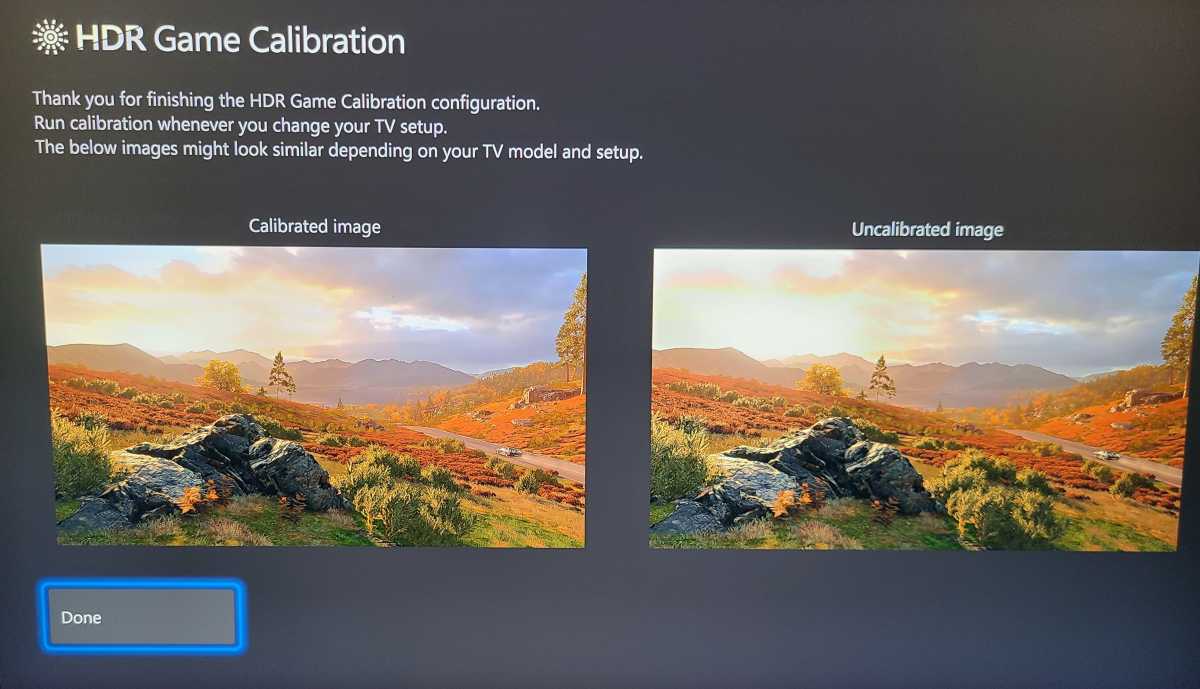
Essentially, the new Windows HDR Calibration app (which hasn’t shipped yet) sounds like the PC analogue of the existing Xbox app, which allows you to configure an Xbox Series S|X console for use with an HDR display. The process is quick, mimicking the setup of stealth games where you’re asked to adjust the brightness of your screen so that the barest details are visible. Specifically, the Xbox app asks you to find the darkest visible detail you can see, the brightest visible detail you can see, and the maximum brightness of your display.
Mark Hachman / IDG
At the end of the process, the Xbox app presents you with a view of the “optimized” and “unoptimized” view of the app, dialing in HDR where it can. In the example picture above, the sky features cloud detail that isn’t there in the unoptimized version. According to Ana Marta Carvalho, Microsoft’s program manager for graphics, the Windows app will use the same basic process. When it shows up, there will be a link to it from the Windows 11 Settings app (System > Display > HDR settings).
The other graphics improvement the new Windows 11 preview build concerns windowed games. Games typically run in either exclusively fullscreen mode, a windowed mode, or a “borderless windowed” mode — a window that looks like a fullscreen app, but lets you more easily swap between open applications. In 2019, Windows 10 quietly began intercepting requests to run games in exclusive fullscreen mode and put them into a borderless windowed mode instead, providing quicker access to PC commands like Alt-Tab, multiple monitor setups and overlays like the Xbox Game Bar, Microsoft wrote in a 2019 developer blog.
In Windows 11, the new build takes all three game modes and applies the optimizations to each of them. Hannah Fisher, a program manager for Microsoft, noted that while Microsoft benefits from this, Windows 11 users do too: moving a game from the old blt-model to a modern flip-model decreases latency and also allows for windowed and borderless-windows games to take advantage of features like AutoHDR and variable-refresh-rate displays.
To enable it, you’ll need to go to the System > Display > Graphics > Change default graphics settings in the Windows 11 Settings menu and toggle the “Optimizations for windowed games” setting on. You’ll need to be running the game and the PC on an HDR display, of course, and again, this is currently limited to the aforementioned Windows 11 preview build. When it’s toggled on, you should see your game be able to take advantage of variable-refresh-rate and AutoHDR in whatever mode it’s in.
Finally, Microsoft said that it’s expanding Dynamic Refresh Rate experiences in Office, Microsoft Edge, and some parts of the Windows interface like the Settings app. Currently, DRR experiences are confined to devices like the Surface Pro 8, which can run at 120Hz while inking, to improve the smoothness of the experience. Now, the 120Hz interface will be applied to these other parts of the interface, too. Essentially, Microsoft’s flipping the high refresh rate proposition on its head: instead of buying a PC with a 120Hz display just for gaming, now you’ll see value in other aspects of your PC, as well.
The obvious question is, when can I get it? Right now, you can’t, unless you’re a member of the Insider program — and even then the Windows HDR app isn’t yet available. Given how frequently Microsoft now wants to update your PC, however, it’s probably a safer bet to assume that these features will roll out to the stable channel of Windows 11 PCs sooner, rather than later.
As PCWorld’s senior editor, Mark focuses on Microsoft news and chip technology, among other beats. He has formerly written for PCMag, BYTE, Slashdot, eWEEK, and ReadWrite.

