
Skip to content
-
Subscribe to our newsletter & never miss our best posts. Subscribe Now!
  • https://www.facebook.com/
  • https://twitter.com/
  • https://t.me/
  • https://www.instagram.com/
  • https://youtube.com/
Excellentpix Excellentpix

Intelligence Redefined

Excellentpix Excellentpix

Intelligence Redefined

  • Green Energy
  • Tech News
  • Gadget
  • Smartphone
  • Laptop
  • PC
  • About Us
    • Advertise Here
    • Contact Us
    • Privacy Policy
    • Sitemap
  • Green Energy
  • Tech News
  • Gadget
  • Smartphone
  • Laptop
  • PC
  • About Us
    • Advertise Here
    • Contact Us
    • Privacy Policy
    • Sitemap
Subscribe
Close

Search

PC

You can now reset and erase a locked iPhone without needing to connect to a PC

By Maria H. Gray
December 15, 2021 2 Min Read
Comments Off on You can now reset and erase a locked iPhone without needing to connect to a PC

Another little tidbit in iOS 15.2 is that Apple has finally added the ability to erase and reset a locked iPhone or iPad, without first needing to connect it to a PC or Mac. This new feature is thanks to a new capability when the iOS device is in Security Lockout mode, after too many failed passcode attempts.

Of course, when an iPhone is unlocked, resetting it to factory stock software is incredibly simple. It just takes a couple of taps in the Settings app to Erase All Contents and Settings.

However, up to now, doing the same when the device is in a locked state has required the use of a computer. This meant if you forgot your iPhone passcode, you would have to put your iPhone into DFU recovery mode and then connect to a PC or Mac to restore via the classic iTunes process.

In 2021, this represents a pretty antiquated ordeal. iOS 15.2 finally introduces a modern solution.

As long as the locked iPhone or iPad in question has an active network connection, you can now erase the device from the lock screen (assuming it is running iOS 15.2 or later).
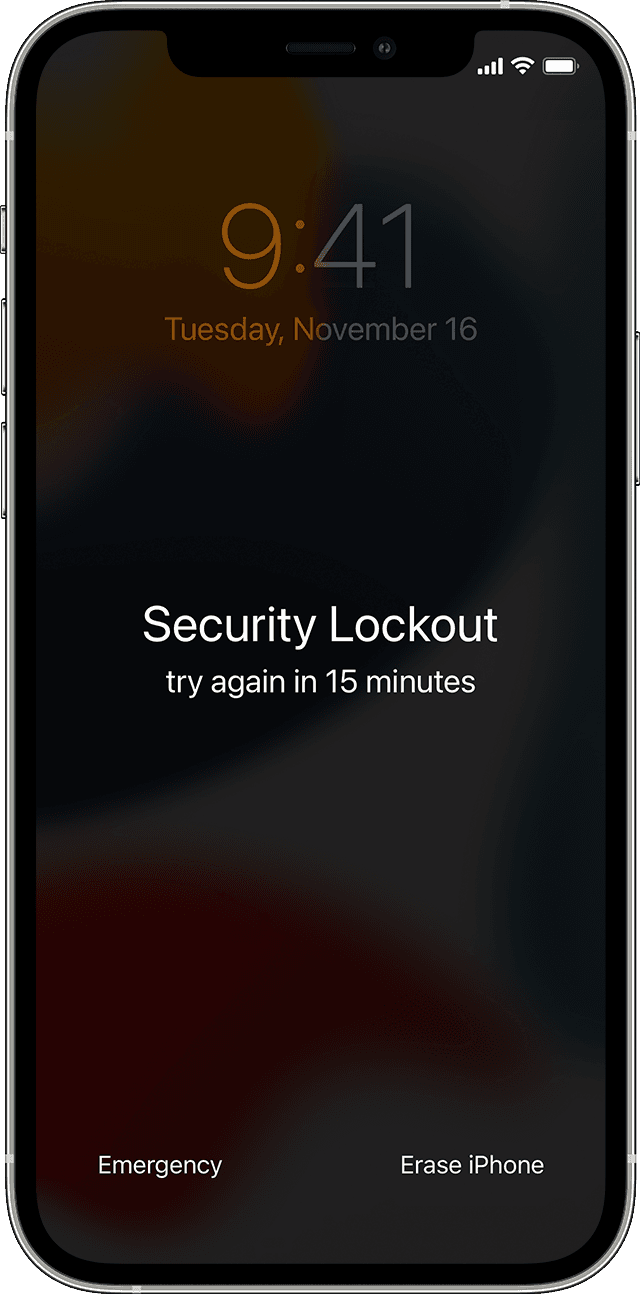
After a couple of failed password attempts, an ‘Erase iPhone’ option will appear at the bottom of the screen. Simply tap on that, confirm you want to erase the device, and then enter your Apple ID password to deregister your account. The device will then reset itself, fully erasing all user data, and starting from fresh.

If the device cannot connect to Wi-Fi or cellular, then the Apple ID authorization step will fail and the device will not be able to be erased. In that case, you will still have to resort to the traditional DFU->PC method.

FTC: We use income earning auto affiliate links. More.


Check out 9to5Mac on YouTube for more Apple news:

Source News

Tags:

ConnecteraseiPhonelockedneedingReset
Author

Maria H. Gray

Follow Me
Other Articles
Previous

Here’s when these stores will stop shipping

Next

These are Android 12 (Go edition)’s headline features for cheaper phones

September 2026
M T W T F S S
 123456
78910111213
14151617181920
21222324252627
282930  
« Aug    

Archives

Categories

  • Car
  • Entertainment
  • Gadget
  • Games
  • general
  • Green Energy
  • internet marketing
  • Laptop
  • Lifestyle
  • PC
  • Property
  • Real estate
  • SEO
  • Smartphone
  • Start Up
  • Tech News
  • Technology

Recent Posts

  • Rev Your Engines: Unleashing the Future of Smart and Sustainable Cars
  • The Untold Growth Hacks of Unicorn Startups: How Tiny Companies Become Billion-Dollar Giants
  • The Future Unveiled: Latest Tech Breakthroughs You Can’t Miss
  • Top Laptops of 2024: Unleashing Power, Portability, and Performance
  • Boost Your PC’s Power: Creative Ways to Upgrade Your Computer Without Breaking the Bank

fiver

Fiverr Logo

Tags

Amazon Android announces app Apple Big Black Buy Car coming deals Electric Galaxy game games gaming Google Heres Hunter iPhone laptop Laptops launch Market Microsoft news phone Pro Release Review sale Sales Samsung Series Smartphone software startup startups Stock tech Tesla top Windows Xbox year

PHP 2026

myheadbands
golittleitaly

BL

excellentpix.com

WhatsApp us