
Skip to content
-
Subscribe to our newsletter & never miss our best posts. Subscribe Now!
  • https://www.facebook.com/
  • https://twitter.com/
  • https://t.me/
  • https://www.instagram.com/
  • https://youtube.com/
Excellentpix Excellentpix

Intelligence Redefined

Excellentpix Excellentpix

Intelligence Redefined

  • Green Energy
  • Tech News
  • Gadget
  • Smartphone
  • Laptop
  • PC
  • About Us
    • Advertise Here
    • Contact Us
    • Privacy Policy
    • Sitemap
  • Green Energy
  • Tech News
  • Gadget
  • Smartphone
  • Laptop
  • PC
  • About Us
    • Advertise Here
    • Contact Us
    • Privacy Policy
    • Sitemap
Subscribe
Close

Search

Gadget

How does Google Chrome know where you want to go on the internet?

By Maria H. Gray
September 6, 2021 2 Min Read
Comments Off on How does Google Chrome know where you want to go on the internet?

Fire up Google Chrome (or any other Chromium-based browser such as Microsoft Edge or Brave) and start typing into the address bar (actually called the omnibar).

The browser starts showing you stuff. And not just random stuff.

It’s almost like it knows us.

It does.

But how does this work? How does the browser figure out what to show you?

Well, there’s a setting that allows you to get a peek behind the curtains and get a glimpse at what’s going on.

Must read: Buying a new Apple gadget? Here’s how to find the best deals (September 2021)

To see what’s going on, type the following into Google Chrome’s omnibar and press enter:

chrome://omnibox/

Note: This varies for other Chromium browsers. For example, for Microsoft’s Edge type edge://omnibox/ and for Brave use brave://omnibox/.

You get a search box and a lot of settings and options.
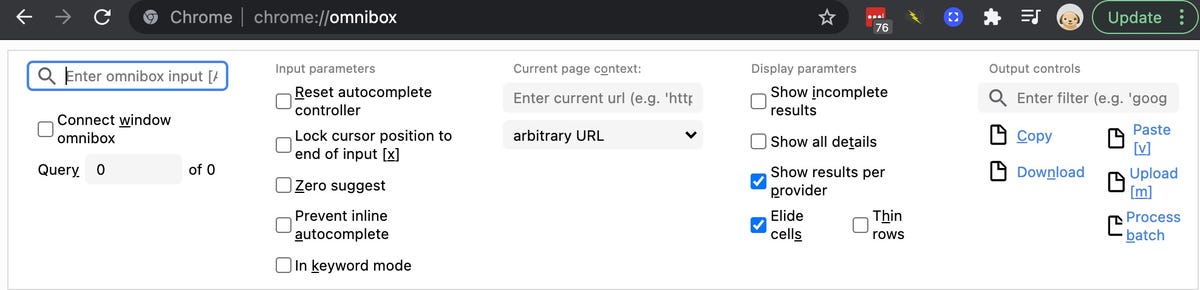
2021-09-05-15-40-44.jpg

Start typing into the box and information will pop up. Information that’s based on both your history, search results, and even things like your bookmarks.

If you start typing in a URL that you visit often, the browser will show you a lot more details, such as when you last visited and how often you visited.
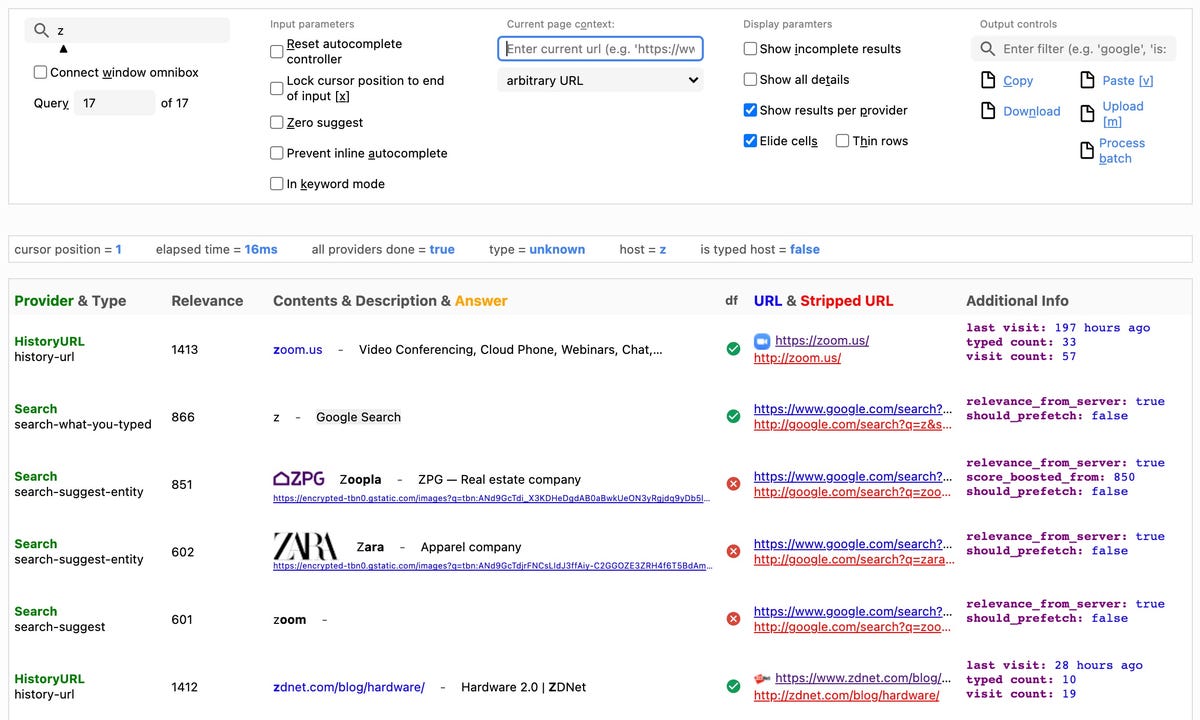
2021-09-05-15-46-10.jpg

And you’ll notice your browser has quite a long memory.

There’s a lot more buried into Chrome and other Chromium browsers. To see all the internal links that the browser offers, type chrome://chrome-urls/.

There’s a lot here to keep you occupied! For example, chrome://media-engagement/ will show you the top websites that you visit for media engagement while chrome://predictors/ shows you the siters you’re most likely to visit when you type a character or characters into the omnibar. 

Source News

Tags:

GoogleInternet
Author

Maria H. Gray

Follow Me
Other Articles
Previous

Concept Mercedes-Maybach EQS SUV takes ultra-luxury electric

Next

2022 Mercedes-Benz AMG EQS: Affalterbach’s flagship goes electric

Categories

  • Car
  • Entertainment
  • Gadget
  • Games
  • general
  • Green Energy
  • internet marketing
  • IT Solutions
  • Laptop
  • Lifestyle
  • Lina Steiner
  • Michael Sturm
  • PC
  • Property
  • Real estate
  • SEO
  • Smartphone
  • Software Company
  • Start Up
  • Tech News
  • Technology
  • uncategorized

Archives

Recent Posts

  • Азино 777 Вход Официальный Сайт – Телефон Горячей Линии Поддержки И Онлайн В Чате
  • Asyabahis İnternet Casino ve Bahis Platformu: Sağlam Gaming Tecrübesi
  • Asyabahis Casino Platformunda Korumalı ile Kazançlı Gaming Deneyimi
  • Belugabahis sitesi: Kapsamlı İnceleme ve Uzman Analiz
  • Asyabahis: Emin Bahis Hizmeti ve Kumar Tecrübesinin Merkezi

BL

excellentpix.com

WhatsApp us